Network & System Security
Unit 9 Summary - Part 3
There are GAMES at the end of this webpage


Cyber Attacks / Hacking!
Cyber security:
is methods to protect computer systems from attacks. These methods are:
-
Password systems
-
Biometrics
-
Identity confirmation
-
software updates


Passwords
Weak passwords:
-
short
-
include common words or names
-
simple sequences of letters or numbers
-
only have one type of character (example: only has lower-case letters)
Good password practice:
-
Use a strong password
-
Make sure you can remember the password
-
Don't use the same password on every website
-
Never tell anyone else your password
Default password:
Some computer systems give you a default password, the word is often: "password" or "1234".
You should never keep the default password, you should change it.
Weak passwords can help hackers break into computer systems.
All staff need to have good password practice and be aware of social engineering threats.
IT staff can improve the password system in the network, for example: IT can set the system to require users to use strong passwords and to change the passwords regularly.

Biometrics
is using physical characteristics to confirm identity, as an alternative to a password.
Types of Biometrics measures:
-
a finger print reader
-
n iris scanner
-
facial recognition software.
A biometric check makes criminals difficult to get access to a device because they can't copy the person's iris, finger print, or facial features.
This technology is often used to protect mobile devices from theft. When they're stolen, the criminals can't use them.


CAPTCHA
is to check if you're a real person, not a bot.
Bots can't a text in a picture or a distorted text.
Your network should have CAPTCHA so hackers' bots are not able to enter.


Email Authentication!
Email confirmation:
to confirm identity by clicking a link sent on an email.
When you first sign up to a system, you provide an email address. Next time you login, an email with a link is sent to your email to verify if it's you trying to get in.
If someone is trying to get in using your account, and you get the notification, don't click the link. Instead, report it, and change your password.

Automatic software updates:
Set all of your anti-malware and all of your software to auto update.
New viruses are released everyday to find your computer's vulnerabilities.
These auto updates install patches to fix the newest threats to your security and safety.


Firewall
is a barrier between the Internet and local network.
Firewall traps every data packet in both direction (in and out) to check the data.
If the data follows the firewall's rules, the data can go.
Firewall works well to:
-
stop malware
-
prevent hackers getting onto the computer
-
block unsuitable content.
Types of firewall:
-
Hardware firewall:
made of a real hardware which data should go through it to get in or out of the network.
-
Software firewall:
should be installed, contains rules to trap and check every data packets.


IP vs MAC addresses
IP (Internet protocol) makes sure every message gets to the right internet address.
Every web host has an IP address.
MAC (Media Access Control) address
is an identification number for each device (examples: PC, laptop, printer, etc.)
IP address routes data accross the Internet to local network.
MAC address routes data from local network to the device.
In wireless connection, devices can be blocked from accessing a network by blocking its MAC address.
White listing
creating a list of devices that are allowed to join the network.


Security Protocols!
HTTPS
is a website's secure protocol. Make sure the beginning of URL uses HTTPS with a lock sign.
HTTPS includes 2 security features:
-
authentication
-
encryption
Authentication
means genuine or a real one, not a fake website to fool you to steal your ID and password.
HTTPS authenticates websites using a handshake system.
Handshake protocol
is signals sent between 2 devices at the start of communication.
The handshake lets each device check that the other is genuine.
A genuine website has a security certificate issued by CA (Certificate Authority).
After confirming certificates, the handshake establishes a private link between the 2 devices.
CA (Certification Authority)
is a company that issues digital certificates for organizations.
Organizations can request a certificate from CA, and the CA regularly checks if the organization is what it claims to be
.
If the company involves in fraud or theft, the certificate is taken away.
Without a certificate, Google search engine will also drop the website from the search engine.
Example of CA: Verisign.

ENCRYPTION!

WiFi Protection
is needed to protect your data going to the wrong hand. Example: 128-bit key is dinamically generated to send each packet of data that you send & receive.


Plain text
consists of words and numbers. Plain text is not secure to be traveling through lots of connections and devices to get to its destination, because other people can read it on its way.
Cypher text
consists of words and numbers that are scrambled using a formula only certain people know.
Encryption
is the process of turning the message into cypher text.
Encryption is done by the computer before the message is sent.
2 Stages of encryption:
-
Encrypt:
when plain text is turned into cypher text.
-
Decrypt:
when cypher text is turned back into plain text.
2 computers are involved in encryption:
-
The sender encrypts the message and sends it.
-
The receiver decrypts the message after receiving it.

Encryption key
is characters of strings or numbers to tell the computer to encrypt plain text, or to decrypt the cypher text.
The encryption is done using a mathematical formula. Computers generate the encryption, store it safely, and take care of it.


Symmetric encryption:
Only the sender and receiver know the key, the problem is the message has to be sent over the internet before encryption can begin.

Asymmetric encryption
consists of:
-
public key:
Public key is shared with other computers. Any computer that needs to send messages can download the public key to encrypt a message before sending it.
-
private key:
is kept secret on your computer and never transmitted. Anyone can send you a secret message, but only you can decrypt it.
Asymetric encryption is safer, but slower.


External threats
are computer attacks by hackers outside of organization/ outside of firewall. They don't have authentication or passwords, try to break the security system.

Internal threats
are computer attacks by the employees who have bad intentions. These employees might be trusted and working for the company, might have their own password and read/write access, and can get inside the security system.


Penetration testing
Attack on the computer system to test the cyber security, by computer experts who work for the company. Once the they find the problem, they can fix it.
A penetration test is called a pen test.
Penetration test types:
-
Black box testing:
is to test external threats. The testers work from outside the firewall, don't use valid IDs or passwords, break in using an external internet connection.
-
White box testing:
is to test internal threats. The testers a valid username, password, and some inside knowledge of the local network structure. They try to cause controlled damage to the computer system from inside the organisation.

Hacker categories

Black hat hackers
break into computer systems to exploit it, to damage computer systems, to steal money, to harm people, or delete or destroy data.
These hackers break the law.

White hat hackers
have permission to carry out penetration testing, and let the company know they're testing it. If they find a problem, they'll report it to be fixed.

Grey hat hackers
Work without permission of the company, and won't do any damage. Might let the company know if they find any problem.
These hackers break the law.
Some government may use hackers services to spy on other country's government's computer systems.

Oxford AQA IGCSE 2019
03.3.
Describe three security measures that could be taken to protect a computer network. [6 marks]
__________________________________________________________________________________
Answer posibilities:

☻ Virus Checker:
-
Scans files to look for malicious code;
-
Should be updated regularly;
-
Regular updating protects against new viruses;
-
Can quarantine / delete malware/suspicious files;
☻ Firewall:
-
Analyses/scans network traffic;
-
Can block traffic from/to suspicious hosts/ computers/addresses;
-
Can block traffic from/to certain ports/certain types of traffic; or Blocks access to network,
☻ Login system / Authentication / Password / Biometric:
-
User has to enter (username and) password;
-
User provides biometric data (accept examples);
-
Login details matched to a database of users;
-
Enforce use of strong passwords;
-
Strong password consists of mix of letters/characters/symbols;
-
Strong passwords are harder to hack/crack/guess; Passwords changed regularly;
☻ MAC address filtering:
-
Each hardware device has unique hardware address;
-
A database of allowed hardware/MAC addresses is kept/whitelist;
-
To connect to a network a device must have an address on the database / whitelist;
☻ Encryption:
-
Use WPA/WPA2;
-
Data is stored/transmitted as ciphertext (or in coded form);
-
Unauthorised users cannot understand or read data /only authorised users can understand it;
-
Key needed to decrypt/read the data;
☻ Unauthorised external storage devices:
-
USB ports on a computer are disabled;
-
Storage devices connected to them cannot be accessed // flash drives cannot be used;

☻ Access rights:
-
Users are associated with certain privileges; These might control files that can be accessed/run // level of Internet access // ability to create/delete files // ability to change settings;
☻ CAPTCHA:
-
Users have to type in some distorted text // recognise images for a set of images; other reasonable tasks Humans can do this but it is a difficult task for computer programs / bots;
☻ (Automatic) software updates:
-
Operating system / software configured to download updates from the Internet;
-
Hackers look for security vulnerabilities in software;
-
Updates can patch security vulnerabilities;
-
Automatic updates are better than manual updates as there is no reliance on people;
☻ Maintain Log:
-
Keep a log/record of actions undertaken;
-
Can be analysed to identify unauthorised activities / facilitates early responses;
-
May deter hackers if they know actions are being tracked;
☻ Use Wired Connections:
-
Wired connections are more secure;
-
Harder to intercept data as not transmitted in air;
-
Must tap into cable/device to steal data;
☻ Backup Data:
-
Make a separate copy of data;
-
Can be restored if the original data is lost/changed;
-
Store away from original;
-
Test that backups work;
☻ Penetration Testing:
-
Get someone to try to break the security measures / to try to hack the network; This can inform changes to security;
-
White-hat has some knowledge of how network configured; Black-hat has no knowledge of how network configured;

Oxford AQA IGCSE Mock Paper

08.1.
Table 1 lists some terms that are related to cyber security and malware. Each term is identified by a letter.
Table 1


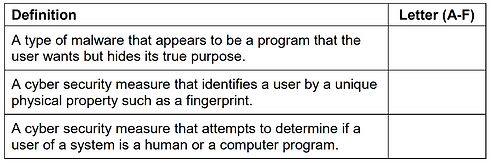
Table 2 lists definitions of some cyber security and malware terms.
Complete Table 2 by writing into it the Letter (A-F) from Table 1 of the term to which the definition corresponds.
Do not use the same letter more than once. [3 marks] Table 2

Games, Click to Play