


Python Coding
Unit 1 Summary - part 1


Coding Videos

Use VARIABLE = VALUE to make the coding easier to understand.
VARIABLES can't use space.
To work with strings, we use quotation marks.
Numbers don't need quotation marks.
FirstName = "Sayori "
LastName = "Ng"

In PRINT, use , (commas) to combine numbers.
In PRINT, + is concatenation to combine strings only.
FullName = "Sayori Ng"
Age = 16
print("Hello, I'm " + FullName + ". I'm", Age, ".")
Use input to let users input their own data.
Use int to convert it to integer, or float to convert it to decimal numbers.
Age = input("Enter age: ")
Age = int(Age)
or
Age = input("Enter age: ")
Age = float(Age)
We can also use a shortcut to convert into integer or float.
Age = int(input("Enter age: "))
or
Age = float(input("Enter age: "))
Use \n to give a new line.
print("\n")
We can calculate in variables = values.
FullName = input("Enter your full name: ")
Age = float(input("Enter your age: "))
Birthday = Age + 1
print("Happy birthday, you're turning", Birthday)

An algorithm is the order/sequence of coding.


A flowchart is a picture of an algorithm.


Stepan Mitkin, How to make acceptance tests from a DRAKON flowchart, drakonhub.com, May 2018

A pseudocode is just a programmer's handwriting about an algorithm.
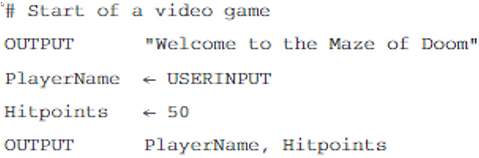


Order of Operation makes computers calculate * or / first.
+ or - are done last.
Use () to tell computer to prioritize + or -.
Pay1 = ("Enter your job's pay: ")
Pay2 = ("Enter your other job's pay: ")
TaxRate = 0.03
Tax = (Pay1 + Pay2) * TaxRate
print("You need to pay", Tax)

Example = 15/2
The Dividend is 15
The Divisor is 2
Normal decimal calculation for that is 7.5
The Quotient is 7
The Remainder/Modulus is 1
Use // to get Quotient
Use % to get Modulus
Dividend = float(input("Enter a number: "))
Divisor = float(input("Enter another number: "))
Quotient = Dividend // Divisor
Modulus = Dividend % Divisor
print (Dividend, "divided by", Divisor)
print (Quotient, "remainder", Modulus)
Don't let users change constants.
Pi = 3.14159
Radius = float(input("Enter a diameter: "))
Circumference = 2 * Pi * Radius
print("What you need is", Circumference, "for the round table's lining.)

We can create text art using Python.
print("=" * 24)
print(" Welcome to my software ")
print("=" *24)

To know a string's length, use len
UserName = "MonsterKing"
NameLength = len(UserName)
print(NameLength)
In Python, the beginning string starts from 0,
So MonsterKing is
012345678910
To call/pick out a character, use [ ] square brackets.
UserName = "MonsterKing"
print(UserName[0])
print(UserName[4])

To call/pick out character 0 to 6, use this coding:
(Remember, character represented by the number on the right will not be included by Python, so always put 1 number higher)
print(UserName[0:7])
or this shortcut
print(UserName[:7])
To call out character 7 to the end, use this coding:
(Remember, character represented by the number on the right will not be included by Python, so always put 1 number higher)
print(UserName[7:11])
or this shortcut
print(UserName[7:])
On the other hand, to know an index number of a string, use this coding:
print(UserName.index("o"))
