


Data Validation
Unit 2 Summary - part 5


Range Check

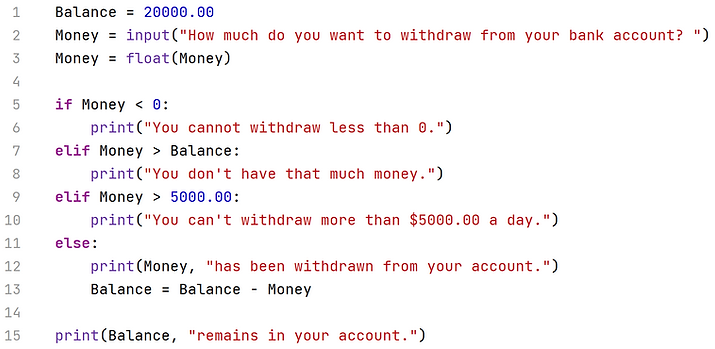
Bank/Money Validation coding:
-
Line 5 is to make sure no one inputs any negative numbers.
-
Line 7 is to make sure no one withdraws bigger amounts than their savings.
-
Line 9 is to make sure no one withdraws more than $5000 a day.
-
Line 2 asks how much users want to withdraw.
If you input $21000, which message do you receive?
Computer executes from top to bottom (based on algorithm), so if we input $21000, it shows line 8's message.

Length Check

Password Change Validation coding:

-
Line 3 is to make sure users input at least 8 characters. If they do, the password is successfully changed.

Type Check

Empty/NULL Validation coding:

-
Line 2 is for people who press the Enter key without typing any menu.

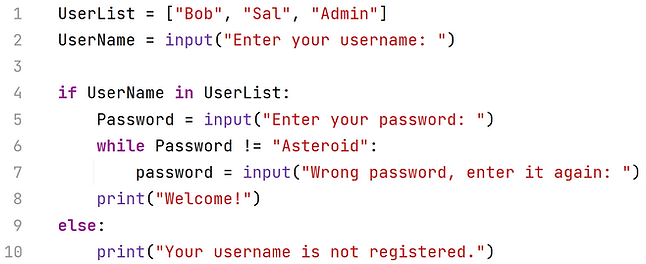
Login Password Validation coding:
-
Line 1 is a list of usernames, they all have the same password in line 6.
-
Line 2: if the username is in the list, line 6 will make sure no one can enter if they input the wrong password.
-
Line 9 is to make sure no one can enter if their username is not in the list.
